
Releases and logs
Each deployment creates a fresh shallow clone of the repository’s default branch in /app/<project>/r<number>. Jakeloud assigns a port and executes the saved command steps. Full Reboot creates another release.
Web projects
- Preparation commands run in order. A failed step stops deployment.
- The final command starts as the candidate process. The previous active release can keep serving traffic.
- Jakeloud waits five seconds and checks that the candidate is still alive.
- It configures Nginx for all project domains and requests HTTPS certificates.
- After successful setup, it stops older releases and marks the new one active.
The startup check tests process survival, not HTTP readiness. Put finite build steps before the final command, and make sure the final process starts serving promptly. There is no application health-endpoint probe or manual traffic-switch control.
Nginx proxies the project’s domains to its assigned port, includes WebSocket upgrade headers, and allows request bodies up to 100 MB.
If proxy or certificate setup fails, Jakeloud attempts to restore the proxy target to an older active process that is still alive. Nginx restarts during configuration; uninterrupted traffic is not guaranteed. Fix a failed deployment and start another Full Reboot.
Workers
A project without domains runs preparation steps and launches its final process, then stops older releases immediately. It skips the five-second web startup check, Nginx, and certificates. Account for a brief overlap between worker processes.
Read status
Select the project’s … button to open its details, then Update status.
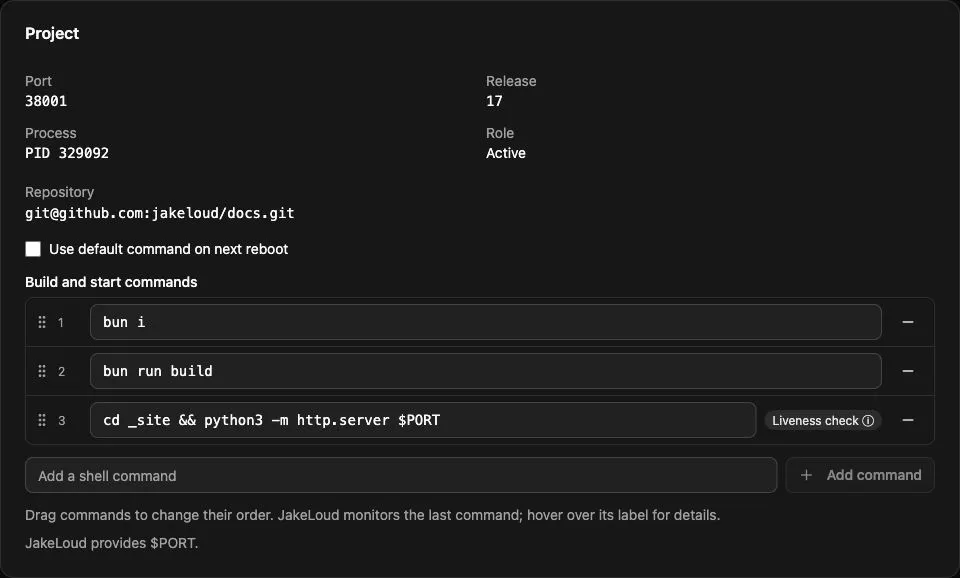
| Detail | Meaning |
|---|---|
| Status / Logs | Latest deployment stage, process status, and recent output. |
| Port | Assigned host port, supplied as $PORT. |
| Release | Latest numbered checkout. |
| Process | Tracked process ID, when running. |
| Role | Candidate is alive but not promoted; Active is promoted; Inactive has no living tracked process. |
The latest release can be a failed candidate while an older active release still serves the domain. The API exposes runtime information for the latest release, not a history of every process.
Ports are allocated starting at 38000, skipping configured projects and tracked releases. Unrelated host services are not checked; use the assigned $PORT and avoid conflicts.
Logs and storage
Logs include clone output and every command’s stdout and stderr. The dashboard and API return up to the last 64 KiB of the latest release log. To inspect the full file on the server:
sudo tail -n 100 /app/my-project/r3.logJakeloud retains the newest checkout directory and the immediately preceding one, removing older directories when a new checkout is created. This is based on release number, not deployment success. Log files are separate and are not pruned with checkout directories; monitor disk usage.
An unexpected final-process exit records a release error. Shutdown sends termination signals to tracked process groups. Restarting the Jakeloud service stops releases and redeploys saved projects from their repositories.